Free VPN for Windows on GitHub: What Is Safe, What Is Limited, and When to Pay
Searching GitHub for a free Windows VPN can lead to three very different things: the official source code of a real VPN app, a community client that still needs your own server, or a list of public proxy credentials maintained by an unknown person. Those are not interchangeable.
This guide answers the free-download question first. It only introduces paid VPNs when a maintained app, customer support, predictable server access, or a refund route solves a problem that a repository cannot.
Quick answer: use GitHub to verify a project’s source, ownership, release history, and security discussion. Download the Windows installer from the project’s official release page or official website. Do not paste random subscription links, public nodes, or PowerShell commands into an administrator terminal just because a repository has stars.
The four types of “VPN GitHub” result
| What you found | What it normally provides | Main risk | Better for |
|---|---|---|---|
| Official open-source VPN app | Source code, signed releases, issue tracker | Fake forks and unofficial installers | Users who can verify publisher and release signatures |
| Self-hosted VPN client | Software that connects to a server you control | You still need to configure and secure a server | Technical users who want infrastructure control |
| Public proxy or node list | Temporary addresses or imported subscriptions | Unknown operator, logging, malware, sudden failure | Disposable testing only, never sensitive accounts |
| Commercial VPN mirror or comparison | Documentation or links to supported apps | Marketing may hide renewal price or limitations | Users who want apps, support and a refund path |
Five checks before downloading anything
- Confirm the owner. Follow the link from the provider’s official website to its GitHub organisation. A similar name is not proof.
- Inspect releases, not only stars. Check recent signed releases, changelogs, open security issues, and whether maintainers still answer reports.
- Verify the installer publisher. Windows should show the expected company or developer when you inspect the file signature.
- Read the commands before running them. Avoid one-line scripts that disable antivirus, change system proxy settings, install certificates, or request administrator access without explaining why.
- Test for leaks and cleanup. After disconnecting, confirm that DNS, browser proxy, startup tasks, and network adapters return to normal.
Honest free options versus unknown GitHub nodes
Established free VPN plans such as Proton VPN Free or Windscribe Free are easier to evaluate than anonymous public nodes because they have official apps, privacy documentation, and identifiable operators. Their limitations still matter: country choice, simultaneous devices, monthly data, streaming access, queueing, and support can differ from paid plans.
An open-source app is not automatically a free global VPN service. The code may be open while the server network costs money, or the app may require a VPS that you configure yourself. Likewise, a public configuration can work today and disappear tomorrow without warning.
When a paid VPN becomes the rational choice
Paying makes sense when failure costs more than the subscription: you need a stable Windows app for work travel, regular streaming, public Wi-Fi, a specific country, multiple devices, or someone to contact when the connection breaks.
The provider order below matches the main VPN Universe comparison.
| Order | Provider | Practical reason to test it | What to verify before keeping it |
|---|---|---|---|
| 1 | StrongVPN | Lower-cost paid route for a supported Windows app and everyday use | Your required country, split tunneling, streaming app, final annual price |
| 2 | ExpressVPN | Premium option when app polish and support matter more than price | Current checkout total, renewal terms, exact streaming service |
| 3 | Surfshark | Useful for households that need many devices | Long-plan commitment, tax, renewal price, TV device support |
| 4 | FlowVPN | Short compatibility test before a longer purchase | Trial end, cancellation method, Windows protocol and server availability |
Affiliate disclosure: these provider links may generate a commission at no additional cost to you. That is why this page separates verifiable checks from marketing claims and tells you what to test before the refund or trial period ends.
A 30-minute Windows test that produces useful evidence
- Record your baseline download speed and latency without a VPN.
- Install only from the official source and restart Windows if the network driver requests it.
- Connect to the nearest server, then the country you actually need.
- Check IP and DNS results in a private browser window.
- Open the exact work, streaming, or communication app you plan to use.
- Disconnect Wi-Fi for ten seconds to see whether the kill switch prevents traffic leakage.
- Reconnect and test whether the VPN recovers without leaving Windows offline.
- Note the final checkout price, renewal price, refund deadline, and support response.
Daily speed evidence from VPN Universe
The chart below is refreshed by the main project. It is a trend comparison, not a promise that your ISP, country, device, or server will produce the same number.
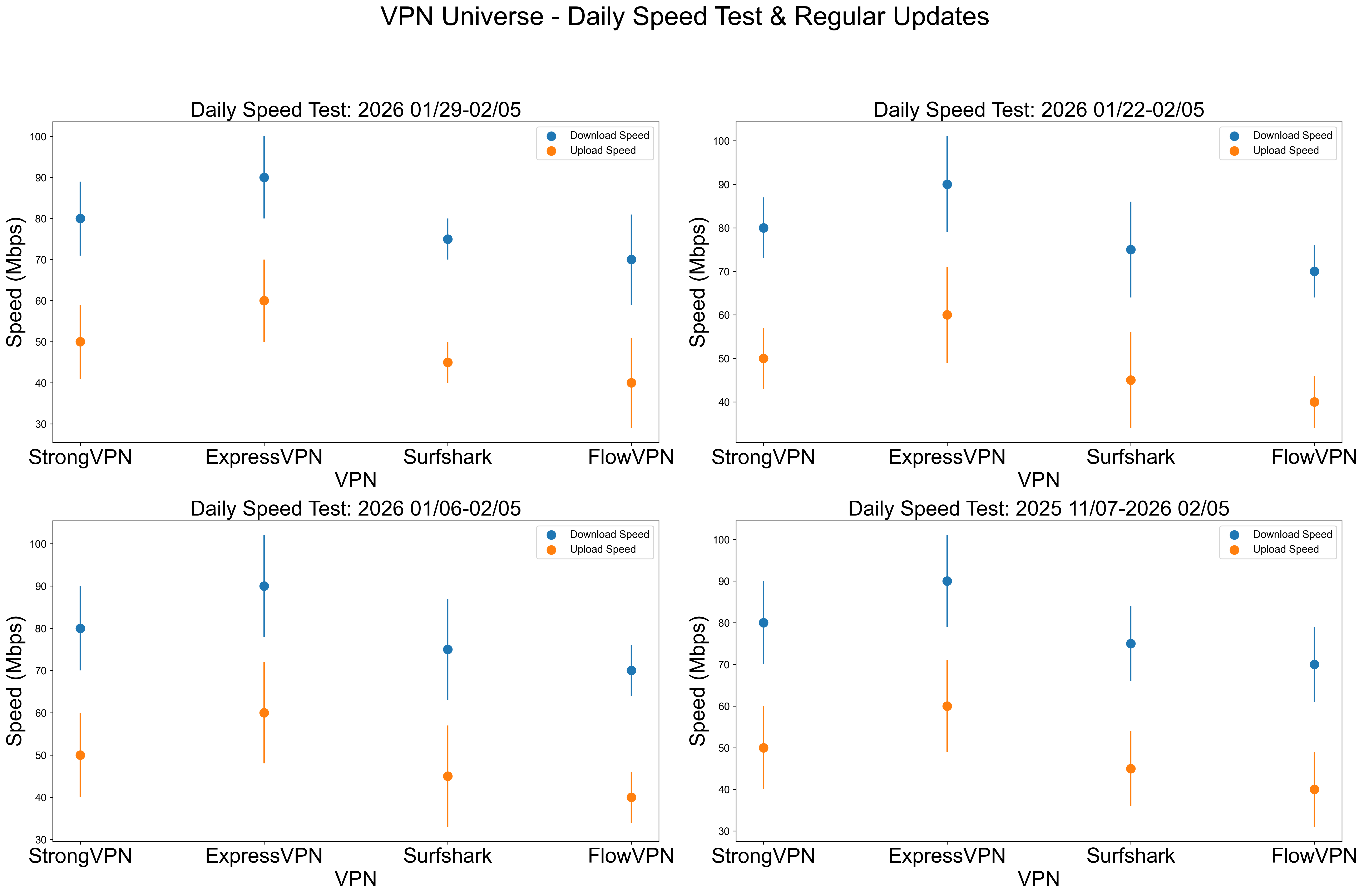
See the full daily VPN comparison and test methodology.
Common mistakes
“The repository has many stars, so the download is safe”
Stars can reflect age, publicity, or interest in the source code. They do not validate every fork, release file, public server, or external link.
“Free and open source means unlimited servers”
Open-source software can be free while bandwidth and servers are not. Confirm whether you receive a service or only a client.
“The VPN connected, so streaming must work”
A green connection icon only confirms the tunnel. Streaming platforms can also evaluate IP reputation, cookies, account region, GPS, billing country, and app-store region.
“The lowest monthly number is the lowest total price”
It may require a two-year purchase and renew at a different rate. Compare the full checkout total for the period you actually want.
Final decision
Use a reputable free plan when you need occasional browsing and accept its limits. Use a self-hosted project when you understand server maintenance and want control. Use a supported paid VPN when you need predictable apps, countries, streaming tests, multiple devices, or a refund route. Avoid unknown public nodes for email, banking, work credentials, or any account you cannot afford to lose.